> ## Documentation Index
> Fetch the complete documentation index at: https://docs.fieldpal.ai/llms.txt
> Use this file to discover all available pages before exploring further.
# Template voice-readiness grading
> Understanding the A–F grade shown on every report template, and what to do about it.
Every report template shows a grade at the top of the editor: a letter from **A to F**, with a short explanation and, if there is room to improve, a list of suggestions.
The grade tells you how easy this form will be for your field team to fill in **by voice**, talking to the AI assistant, rather than typing.
## Why templates get graded
Most templates start life as a paper form typed up field-for-field, or a form the AI has drafted from a description. Neither process tells you whether the result will actually work when someone is on site, hands full, talking to the assistant instead of typing.
A form built for typing does not automatically work for talking. Long capitalised field codes, forms with no guidance on what a good answer looks like, and huge flat lists of fields are all fine on a screen and awkward out loud. The grade exists to catch that before your team does.
Grading is advisory only. It never blocks you from saving a template, and it never changes while you are typing, only when you save and reopen it.
## Where to find it
Open any template from **Report templates** in the left-hand navigation. The grading panel sits at the top of the editor, above your fields.
### A well-graded form
A small, clean template, seven fields, each with a plain-English description of what it's asking for:
 **A, "Ready to fill in by voice."** There is nothing to fix, so the panel confirms it in one line instead of listing suggestions.
### A form with one thing to fix
The same template, before its AI instructions were added:
**A, "Ready to fill in by voice."** There is nothing to fix, so the panel confirms it in one line instead of listing suggestions.
### A form with one thing to fix
The same template, before its AI instructions were added:
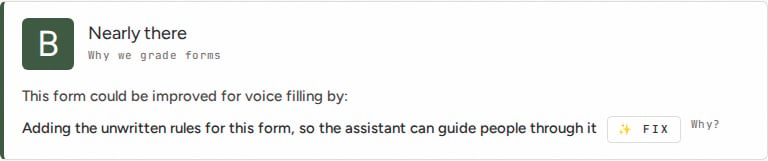 **B, "Nearly there."** Everything about the fields themselves is fine. The one thing missing is a standing brief for the assistant: the unwritten context a person filling this in would just know, but the AI has no way to guess. That is enough on its own to keep a template off an A. Click **FIX** next to the suggestion and the assistant will draft one for you to approve.
### A form that needs real work
A 129-field form typed up field-for-field from a paper sheet, with capitalised codes and almost no guidance:
**B, "Nearly there."** Everything about the fields themselves is fine. The one thing missing is a standing brief for the assistant: the unwritten context a person filling this in would just know, but the AI has no way to guess. That is enough on its own to keep a template off an A. Click **FIX** next to the suggestion and the assistant will draft one for you to approve.
### A form that needs real work
A 129-field form typed up field-for-field from a paper sheet, with capitalised codes and almost no guidance:
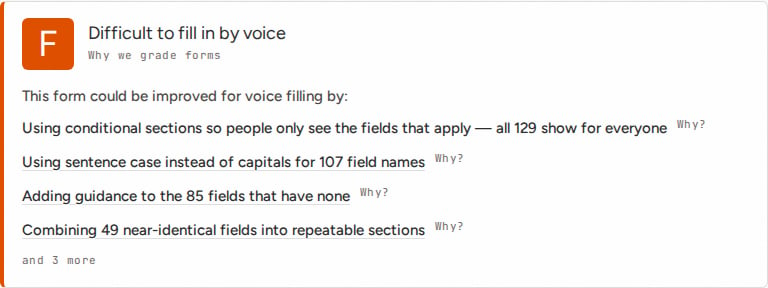 **F, "Difficult to fill in by voice."** The panel lists its top suggestions, each with a **Why?** link explaining the actual consequence for someone filling it in out loud, and tells you how many more there are beyond the ones shown. Click a suggestion to jump straight to the fields it applies to.
## What the grade is looking at
There is no single thing that makes a form grade well or badly. The panel checks for:
* **Fields that reference each other incorrectly**: a conditional section pointing at a field that does not exist, or a field name with hidden extra spaces
* **Repeated field groups** that should be one repeatable section instead of being typed out many times
* **Hard-to-say field names**: ALL CAPS, abbreviations, near-identical names sitting next to each other
* **Missing guidance**: fields with no description of what a good answer looks like
* **Too many fields, or sections that run too long**
* **Empty sections**: a heading with nothing underneath it
* **A field asking for more than it's built for**: a single-line answer where the guidance is really asking for a paragraph
* **No standing instructions for the assistant**: the unwritten rules of the form that only a person would otherwise know
Every suggestion on the panel traces back to one of these, so a grade is never a mystery.
Two rules sit on top of the checks above. Anything genuinely broken caps the grade at C, however good everything else is. And any suggestion at all rules out an A: a grade doesn't mean "good enough", it means the panel has nothing left to tell you.
## Improving a grade
* **Save, then reopen, to see a grade update.** The grade is calculated when the template is opened, not live as you type, so a change won't show on the panel until you save and come back to it.
* **Start with the Why? links, not the grade itself.** The letter is a summary; the explanation tells you what will actually go wrong for the person filling the form in.
* **The ✨ FIX button on the AI instructions suggestion** opens a short set of questions about your form, and drafts a standing brief for the assistant from your answers. You approve it before anything is saved.
* **A low grade doesn't mean start again.** Suggestions are ranked, so working down the list in order gets you the most improvement for the least effort.
## Summary
| Grade | What it means |
| - | - |
| A | Ready to fill in by voice, nothing to suggest |
| B–C | Works, but one or more things would make it easier or safer to fill in by voice |
| D–F | Will be difficult or unreliable to fill in by voice as it stands |
Grading applies to every template in your organisation automatically. There is nothing to turn on: just open a template to see its grade.
**F, "Difficult to fill in by voice."** The panel lists its top suggestions, each with a **Why?** link explaining the actual consequence for someone filling it in out loud, and tells you how many more there are beyond the ones shown. Click a suggestion to jump straight to the fields it applies to.
## What the grade is looking at
There is no single thing that makes a form grade well or badly. The panel checks for:
* **Fields that reference each other incorrectly**: a conditional section pointing at a field that does not exist, or a field name with hidden extra spaces
* **Repeated field groups** that should be one repeatable section instead of being typed out many times
* **Hard-to-say field names**: ALL CAPS, abbreviations, near-identical names sitting next to each other
* **Missing guidance**: fields with no description of what a good answer looks like
* **Too many fields, or sections that run too long**
* **Empty sections**: a heading with nothing underneath it
* **A field asking for more than it's built for**: a single-line answer where the guidance is really asking for a paragraph
* **No standing instructions for the assistant**: the unwritten rules of the form that only a person would otherwise know
Every suggestion on the panel traces back to one of these, so a grade is never a mystery.
Two rules sit on top of the checks above. Anything genuinely broken caps the grade at C, however good everything else is. And any suggestion at all rules out an A: a grade doesn't mean "good enough", it means the panel has nothing left to tell you.
## Improving a grade
* **Save, then reopen, to see a grade update.** The grade is calculated when the template is opened, not live as you type, so a change won't show on the panel until you save and come back to it.
* **Start with the Why? links, not the grade itself.** The letter is a summary; the explanation tells you what will actually go wrong for the person filling the form in.
* **The ✨ FIX button on the AI instructions suggestion** opens a short set of questions about your form, and drafts a standing brief for the assistant from your answers. You approve it before anything is saved.
* **A low grade doesn't mean start again.** Suggestions are ranked, so working down the list in order gets you the most improvement for the least effort.
## Summary
| Grade | What it means |
| - | - |
| A | Ready to fill in by voice, nothing to suggest |
| B–C | Works, but one or more things would make it easier or safer to fill in by voice |
| D–F | Will be difficult or unreliable to fill in by voice as it stands |
Grading applies to every template in your organisation automatically. There is nothing to turn on: just open a template to see its grade.